Olho no Carro: Consultar Placa
Olho no Carro

3.8 stars8,454 reviews1,000,000+Free
Auto & VehiclesEveryoneVersion 2.14.0Updated 4/17/2026, 1:31:32 AM
Open in StoreLooking for a used vehicle history check? Use the Olho no Carro app!
Want to buy a used car, motorcycle, van, or truck safely and without surprises?
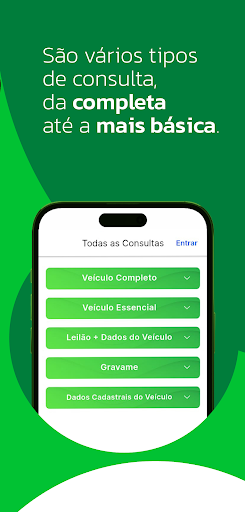
With Olho no Carro, you can perform a complete vehicle history check, identify restrictions, fines, debts, recalls, auctions, and more, avoiding scams and saving time and money.
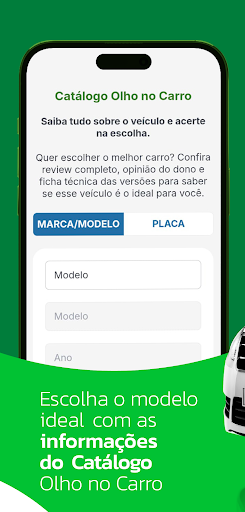
What you'll find in the app: - Free and unlimited basic check - Check by Renavam (Brazilian vehicle registration number), license plate, or chassis number, with affordable prices - Complete Vehicle Check: detailed and exclusive history - Real-time information on theft/robbery, auctions, fines, IPVA (Brazilian vehicle tax), and accidents - Olho no Carro Catalog: search by license plate, make, or model. In the Catalog you'll see: - Technical specifications with complete data - Opinions from real owners - Text + video reviews, practical for comparing models. Why download? - Negotiate with more confidence and security - Discover if the vehicle fits your profile - Lightweight and intuitive app - Reliable and constantly updated data - Complete Vehicle Inquiry: the most comprehensive on the market - Easy payment: card, bank slip or PIX - Support for cars, motorcycles, vans and trucks.
Over 1 million downloads. Privacy and trust - 100% secure and compliant with the LGPD (Brazilian General Data Protection Law) - Encrypted and protected data - We are always updating and improving the app.
Download now and buy with confidence! Before closing a deal, consult, compare and decide with confidence.
Olho no Carro has no affiliation with the Government.
Want to buy a used car, motorcycle, van, or truck safely and without surprises?
With Olho no Carro, you can perform a complete vehicle history check, identify restrictions, fines, debts, recalls, auctions, and more, avoiding scams and saving time and money.
What you'll find in the app: - Free and unlimited basic check - Check by Renavam (Brazilian vehicle registration number), license plate, or chassis number, with affordable prices - Complete Vehicle Check: detailed and exclusive history - Real-time information on theft/robbery, auctions, fines, IPVA (Brazilian vehicle tax), and accidents - Olho no Carro Catalog: search by license plate, make, or model. In the Catalog you'll see: - Technical specifications with complete data - Opinions from real owners - Text + video reviews, practical for comparing models. Why download? - Negotiate with more confidence and security - Discover if the vehicle fits your profile - Lightweight and intuitive app - Reliable and constantly updated data - Complete Vehicle Inquiry: the most comprehensive on the market - Easy payment: card, bank slip or PIX - Support for cars, motorcycles, vans and trucks.
Over 1 million downloads. Privacy and trust - 100% secure and compliant with the LGPD (Brazilian General Data Protection Law) - Encrypted and protected data - We are always updating and improving the app.
Download now and buy with confidence! Before closing a deal, consult, compare and decide with confidence.
Olho no Carro has no affiliation with the Government.
Developer email
comercial@olhonocarro.com.br
Developer website
https://www.olhonocarro.com.br/Released
Jul 10, 2023
Current version
2.14.0
Android version
5.0
Reviews & Ratings
3.8
out of 5
5
4
3
2
1
⚠️ Users report mixed experiences
8,454 reviewsScreenshots