Dice Connect - Sequence Twist
FunCraft Games

4.7 stars1,792 reviews50,000+Free
BoardEveryoneVersion 1.2.25127Updated 4/3/2026, 6:48:39 PM
Open in StoreTurn every roll into a smart move and prove your strategy skills!
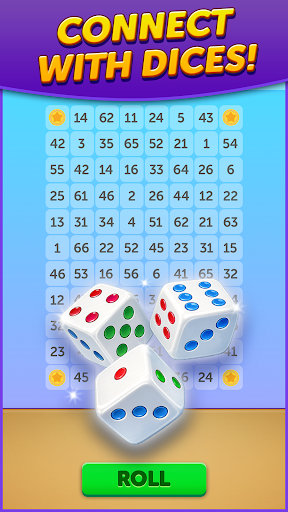
Dice Connect is a free-to-play strategy dice board game inspired by the classic Sequence — reimagined with dice for deeper decisions and nonstop excitement. Roll three dice, choose how to use them, and connect your sequence before your opponent does.
Luck gives you options. Strategy wins the game.
Why players love Dice Connect:
• Unique Dice Strategy – Roll 3 dice and decide how to play them. Adapt to the board, block opponents, and create your own luck.
• Classic Board Game Feel – Inspired by Sequence, built for modern competitive play.
• Real-Time PvP Matches – Challenge players worldwide in fast, skill-based head-to-head games.
• Leagues & Rankings – Climb divisions, dominate the leaderboard, and earn exclusive rewards.
• Journey Mode & Challenges – Complete missions, unlock content, and sharpen your strategy.
• Achievements & Rewards – Earn badges, collect prizes, and show off your mastery.
• Easy to Learn, Hard to Master – Perfect for casual players, dice lovers, and strategy fans.
Whether you enjoy dice games, board games, or competitive strategy, Dice Connect delivers endless replayability and satisfying wins.
Every match is different, and every decision matters.
Roll smart. Think ahead. Connect first.
Download Dice Connect now and start building your winning sequence!
Dice Connect is a free-to-play strategy dice board game inspired by the classic Sequence — reimagined with dice for deeper decisions and nonstop excitement. Roll three dice, choose how to use them, and connect your sequence before your opponent does.
Luck gives you options. Strategy wins the game.
Why players love Dice Connect:
• Unique Dice Strategy – Roll 3 dice and decide how to play them. Adapt to the board, block opponents, and create your own luck.
• Classic Board Game Feel – Inspired by Sequence, built for modern competitive play.
• Real-Time PvP Matches – Challenge players worldwide in fast, skill-based head-to-head games.
• Leagues & Rankings – Climb divisions, dominate the leaderboard, and earn exclusive rewards.
• Journey Mode & Challenges – Complete missions, unlock content, and sharpen your strategy.
• Achievements & Rewards – Earn badges, collect prizes, and show off your mastery.
• Easy to Learn, Hard to Master – Perfect for casual players, dice lovers, and strategy fans.
Whether you enjoy dice games, board games, or competitive strategy, Dice Connect delivers endless replayability and satisfying wins.
Every match is different, and every decision matters.
Roll smart. Think ahead. Connect first.
Download Dice Connect now and start building your winning sequence!
Developer email
dice-connect-support@funcraft.com
Developer website
https://www.funcraft.com/Released
Feb 9, 2026
Current version
1.2.25127
Android version
7.0
Reviews & Ratings
4.7
out of 5
5
4
3
2
1
🌟 Loved by users
1,792 reviewsScreenshots