MobileBiz Pro - Invoice Maker
Mobilebiz Systems

4.4 stars1,986 reviews10,000+Free
BusinessEveryoneVersion 1.4.3Updated 4/9/2026, 7:54:17 AM
Open in StoreCreate professional invoices, estimates, sales orders, and cash sales offline. MobileBiz Pro is an invoicing and business app for contractors, freelancers, and field service pros. Trusted since 2010.
INVOICES, ESTIMATES & SALES ORDERS
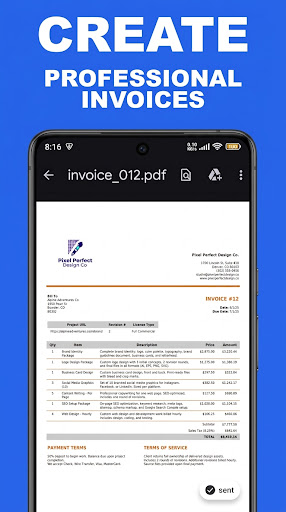
• Create PDF invoices with your logo, custom colors, fonts, and page layouts.
• Generate estimates (quotes) and convert them to sales orders or invoices with one tap.
• Handle cash sales — paid on the spot.
• Send invoices by email or SMS directly to clients.
• Capture customer signatures on-site to approve estimates and invoices.
• Attach photos and files to any transaction and include them in the emailed PDF.
• Apply discounts and shipping charges to any invoice.
• Set up recurring invoices for repeat clients.
ACCEPT PAYMENTS & TRACK AGING
• Record cash, check, card, and bank transfer payments.
• Record payments against multiple invoices at once.
• Include PayPal links on invoices to get paid online faster.
• Customer aging reports at 30, 60, and 90+ days.
• Track customer balances and send statements in one tap.
MANAGE PRODUCTS & INVENTORY
• Build a product and service catalog with categories, barcodes, and stock levels.
• Scan barcodes from the item list or a dedicated scan screen to look up items fast.
• Inventory updates automatically with each sale.
• Set price levels for wholesale, retail, and VIP customers.
• Track item cost, sales price, and profit margins.
WORKS OFFLINE
Create invoices, record payments, and run reports from job sites with no cell signal. Your business data is stored on your device.
GLOBAL SEARCH
Search across customers, items, invoices, estimates, orders, and payments from one search bar.
10 BUILT-IN BUSINESS REPORTS
• Sales by month, quarter, and year
• Sales by item
• Sales by customer
• Customer profitability
• Customer aging
• Payments report
• Inventory report
• Out of stock report
• Monthly tax report
• Profit and Loss (Income Statement)
CUSTOMIZE EVERYTHING
• Print templates — logos, fonts, colors, watermarks, letter/A4/legal page sizes, portrait or landscape.
• Email and SMS templates.
• Custom fields on contacts, items, transaction headers, line-item columns, and projects.
• Custom transaction statuses to match your workflow.
• Lock the app with a PIN.
• Tax codes — single tax, dual tax, or tax-inclusive pricing.
• Payment methods, payment terms, price levels, currencies, and date formats.
RUN MULTIPLE BUSINESSES
Manage separate companies from one app. Each business has its own customers, products, invoices, reports, and settings.
IMPORT & EXPORT
• Import customers, items, and transactions from CSV.
• Export to CSV or to QuickBooks Online (via Google Sheets or CSV) for your accountant.
BACK UP YOUR DATA
Scheduled backups to Dropbox or Google Drive. Restore any backup to your device.
UPGRADE TO PLUS FOR MORE
Plus adds expense tracking with receipt photos, unlimited photo attachments on invoices, unlimited Google Drive backup, QuickBooks export, income statements, and cloud photo sync across devices.
IDEAL FOR
• Trades — electricians, plumbers, HVAC, mechanics, painters.
• Field services — landscapers, cleaners, handymen, delivery services, installation services.
• Computer & tech services — IT consultants, computer repair, managed services.
• Automotive — auto repair, car audio, detailing, towing.
• Professionals — consultants, designers, freelancers, self-employed, entrepreneurs.
• Commerce — wholesalers, distributors, retailers.
Available in English, Spanish, French, Italian, German, Portuguese. Other languages via editable templates.
Questions? Reach us at mobilebizpro.com — we respond to every message.
INVOICES, ESTIMATES & SALES ORDERS
• Create PDF invoices with your logo, custom colors, fonts, and page layouts.
• Generate estimates (quotes) and convert them to sales orders or invoices with one tap.
• Handle cash sales — paid on the spot.
• Send invoices by email or SMS directly to clients.
• Capture customer signatures on-site to approve estimates and invoices.
• Attach photos and files to any transaction and include them in the emailed PDF.
• Apply discounts and shipping charges to any invoice.
• Set up recurring invoices for repeat clients.
ACCEPT PAYMENTS & TRACK AGING
• Record cash, check, card, and bank transfer payments.
• Record payments against multiple invoices at once.
• Include PayPal links on invoices to get paid online faster.
• Customer aging reports at 30, 60, and 90+ days.
• Track customer balances and send statements in one tap.
MANAGE PRODUCTS & INVENTORY
• Build a product and service catalog with categories, barcodes, and stock levels.
• Scan barcodes from the item list or a dedicated scan screen to look up items fast.
• Inventory updates automatically with each sale.
• Set price levels for wholesale, retail, and VIP customers.
• Track item cost, sales price, and profit margins.
WORKS OFFLINE
Create invoices, record payments, and run reports from job sites with no cell signal. Your business data is stored on your device.
GLOBAL SEARCH
Search across customers, items, invoices, estimates, orders, and payments from one search bar.
10 BUILT-IN BUSINESS REPORTS
• Sales by month, quarter, and year
• Sales by item
• Sales by customer
• Customer profitability
• Customer aging
• Payments report
• Inventory report
• Out of stock report
• Monthly tax report
• Profit and Loss (Income Statement)
CUSTOMIZE EVERYTHING
• Print templates — logos, fonts, colors, watermarks, letter/A4/legal page sizes, portrait or landscape.
• Email and SMS templates.
• Custom fields on contacts, items, transaction headers, line-item columns, and projects.
• Custom transaction statuses to match your workflow.
• Lock the app with a PIN.
• Tax codes — single tax, dual tax, or tax-inclusive pricing.
• Payment methods, payment terms, price levels, currencies, and date formats.
RUN MULTIPLE BUSINESSES
Manage separate companies from one app. Each business has its own customers, products, invoices, reports, and settings.
IMPORT & EXPORT
• Import customers, items, and transactions from CSV.
• Export to CSV or to QuickBooks Online (via Google Sheets or CSV) for your accountant.
BACK UP YOUR DATA
Scheduled backups to Dropbox or Google Drive. Restore any backup to your device.
UPGRADE TO PLUS FOR MORE
Plus adds expense tracking with receipt photos, unlimited photo attachments on invoices, unlimited Google Drive backup, QuickBooks export, income statements, and cloud photo sync across devices.
IDEAL FOR
• Trades — electricians, plumbers, HVAC, mechanics, painters.
• Field services — landscapers, cleaners, handymen, delivery services, installation services.
• Computer & tech services — IT consultants, computer repair, managed services.
• Automotive — auto repair, car audio, detailing, towing.
• Professionals — consultants, designers, freelancers, self-employed, entrepreneurs.
• Commerce — wholesalers, distributors, retailers.
Available in English, Spanish, French, Italian, German, Portuguese. Other languages via editable templates.
Questions? Reach us at mobilebizpro.com — we respond to every message.
Developer email
support@mobilebizpro.com
Developer website
https://mobilebizpro.comReleased
Nov 27, 2010
Current version
1.4.3
Android version
8.0
Reviews & Ratings
4.4
out of 5
5
4
3
2
1
🙂 Mostly positive reviews
1,986 reviewsScreenshots