現代スペイン語辞典・和西辞典 改訂版
LogoVista

<================================
The best-rated Spanish-Japanese and Japanese-Spanish dictionaries!
The app version is now available with enhanced features!
<================================
■ Dictionary Content Guide ■
・The "Modern Spanish Dictionary and Japanese-Spanish Dictionary Revised Edition" is a set of dictionaries consisting of the "Modern Spanish Dictionary Revised Edition" and the "Japanese-Spanish Dictionary Revised Edition."
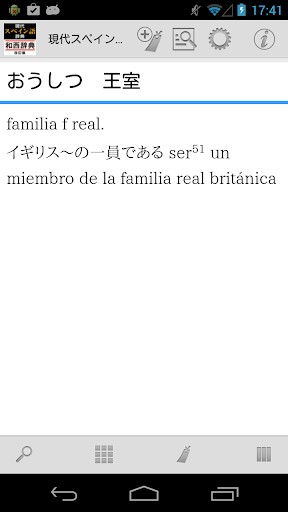
・The "Modern Spanish Dictionary Revised Edition" is a Spanish-Japanese dictionary that allows you to understand Spanish more accurately and in greater detail.
・Contains approximately 45,000 entries.
・Suitable for beginners, and especially recommended for foreign language curricula at universities.
・Includes many expressions from Central and South America and the latest terminology.
* It not only provides translations but also delves into nuances, grammar, and cultural background.
* It adopts a new alphabet layout and includes detailed grammatical explanations as an appendix.
* It also includes numerous pronunciation audio recordings by native speakers.
* The "Revised Japanese-Spanish Dictionary" is a useful dictionary for everyone from beginner learners to travelers and business people.
* It contains approximately 35,000 entries.
* It includes abundant example sentences in natural Spanish by native speakers, and detailed explanations of Latin American Spanish.
* It also includes a comprehensive appendix.
■ Enhance the dictionary content with app features! ■
* Equipped with a "(Simplified) Verb Conjugation Search" function that corresponds to the characteristics of Spanish!
You can search for the infinitive headword by using the conjugated form of the verb as a search keyword.
Furthermore, automatic conversion of conjugations and a re-search option have been added to other keyword search conditions!
* Headwords are displayed side-by-side and scrollable! A "Touch Panel Search" function has been added.
This dictionary can be used as a headword index for both Spanish-Japanese and Japanese-Spanish dictionaries, and also includes appendices.
■ Comprehensive Search Function! ■
- Automatic search with each keyword input. Incremental search instantly updates search results.
- Voice input is also supported for keyword input.
- Detailed keyword matching conditions can be specified, such as "prefix match" and "suffix match." Instant re-searching occurs when conditions are changed.
- "Full-text search" is available for almost all dictionaries, allowing you to search the text of all entries.
- "In-text search" is available to search the content of the dictionary entry you are currently reading.
- Automatically records the history of entered keywords and displayed entries. Re-entering and re-displaying is easy.
■ Sharing with Other Apps Made Possible by the App! ■
- Supports the basic Android operation "share"! You can have the dictionary browser search text selected in another app.
* The dictionary search function allows you to freely specify the dictionary from your existing dictionary apps.
* Conversely, you can use the text of dictionary entries to perform web searches. Of course, you can also search within the dictionary app itself.
■ Customize Text for Easy Reading! ■
* You can finely adjust the font size of dictionary entry text.
* A dark theme display mode (black background + white text) is also available to reduce eye strain.
* Of course, you can also change the item size using touch controls.
■ Bookmark Important Information! ■
* You can bookmark dictionary entries at any time.
* Bookmarks can be categorized into 10 color patterns, and memo text can be set.
* The bookmark list screen includes a filter function to display only bookmarks of a specific color.
* The display order on the bookmark list screen can be sorted by registration date, item order, etc.
■ Powerful Integration Between Dictionary Series! ■
* You can freely group dictionary series together and search them all at once.
* The search results list for group dictionaries allows you to jump directly to the beginning of each member's dictionary entry.
* Duplicates are OK! You can register one dictionary as a member in various groups simultaneously.
* Bookmarks in group dictionaries can, of course, be displayed together.
* You can instantly search other dictionaries using the text of the currently displayed dictionary entry.
■ Convenient additional and extended features are also included! ■
* You can have the text of dictionary entries read aloud using synthesized speech.
■ No internet connection required after setup! ■
* All data required by the dictionary is stored within the app.
* After installation and setup, it can be used completely offline.
■ Update History [Latest Version 2.01] ■
* Significantly revised the acquisition and management of dictionary data.
* Switched the auxiliary (dictionary browser) app used in conjunction with the dictionary app to a new, separate app.
■ Regarding the Handwriting Input Function ■
* The handwriting input function "Rakuhira," which was built into the dictionary browser app,
is no longer available due to development issues with the function provider.
We sincerely apologize for the inconvenience, but please consider using an alternative such as the "GBoard-Google Keyboard" app.
■ Important Notes ■
* To use this app, a free auxiliary app for searching and displaying the LogoVista electronic dictionary series is required.
If the auxiliary app is not found when you launch the app, an option to go to Google Play will be displayed.
Please obtain "LogoVista Electronic Dictionary Browser Ver.2 for Android" from Google Play.
* To use the text-to-speech function, you will need to install the free "Google Text-to-Speech" app separately.
* If you have any questions about our products, please contact us at the address below.
android.dev@logovista.co.jp
■ Data Saving to External Storage (External SD Card) ■
・Some of the dictionary app data can be saved to external storage (external SD card).
*There are conditions and precautions for use. For details, please check Q8 on our Q&A page below.
https://www.logovista.co.jp/LVERP/information/support/user_qa/android/top.html#Q8
■ Operating Environment ■
・Android OS 7.0 to 13.0
*The operating environment is for the latest publicly available version. Conditions may differ if you are using an older version.
■ Chromebook Compatible Models
To use the LogoVista Electronic Dictionary Series for Android app on a Chromebook, a Chromebook compatible with Google Play (Android apps) is required.
■ Not Supported ■
• Android OS 1.0 to 6.0.1
• Android devices with non-ARM-based CPUs
• "Go Edition" versions of each Android OS
■ Developer/Distributor ■
Logovista Co., Ltd. https://www.logovista.co.jp/
■ Content Publisher ■
Hakusuisha Co., Ltd.
The best-rated Spanish-Japanese and Japanese-Spanish dictionaries!
The app version is now available with enhanced features!
<================================
■ Dictionary Content Guide ■
・The "Modern Spanish Dictionary and Japanese-Spanish Dictionary Revised Edition" is a set of dictionaries consisting of the "Modern Spanish Dictionary Revised Edition" and the "Japanese-Spanish Dictionary Revised Edition."
・The "Modern Spanish Dictionary Revised Edition" is a Spanish-Japanese dictionary that allows you to understand Spanish more accurately and in greater detail.
・Contains approximately 45,000 entries.
・Suitable for beginners, and especially recommended for foreign language curricula at universities.
・Includes many expressions from Central and South America and the latest terminology.
* It not only provides translations but also delves into nuances, grammar, and cultural background.
* It adopts a new alphabet layout and includes detailed grammatical explanations as an appendix.
* It also includes numerous pronunciation audio recordings by native speakers.
* The "Revised Japanese-Spanish Dictionary" is a useful dictionary for everyone from beginner learners to travelers and business people.
* It contains approximately 35,000 entries.
* It includes abundant example sentences in natural Spanish by native speakers, and detailed explanations of Latin American Spanish.
* It also includes a comprehensive appendix.
■ Enhance the dictionary content with app features! ■
* Equipped with a "(Simplified) Verb Conjugation Search" function that corresponds to the characteristics of Spanish!
You can search for the infinitive headword by using the conjugated form of the verb as a search keyword.
Furthermore, automatic conversion of conjugations and a re-search option have been added to other keyword search conditions!
* Headwords are displayed side-by-side and scrollable! A "Touch Panel Search" function has been added.
This dictionary can be used as a headword index for both Spanish-Japanese and Japanese-Spanish dictionaries, and also includes appendices.
■ Comprehensive Search Function! ■
- Automatic search with each keyword input. Incremental search instantly updates search results.
- Voice input is also supported for keyword input.
- Detailed keyword matching conditions can be specified, such as "prefix match" and "suffix match." Instant re-searching occurs when conditions are changed.
- "Full-text search" is available for almost all dictionaries, allowing you to search the text of all entries.
- "In-text search" is available to search the content of the dictionary entry you are currently reading.
- Automatically records the history of entered keywords and displayed entries. Re-entering and re-displaying is easy.
■ Sharing with Other Apps Made Possible by the App! ■
- Supports the basic Android operation "share"! You can have the dictionary browser search text selected in another app.
* The dictionary search function allows you to freely specify the dictionary from your existing dictionary apps.
* Conversely, you can use the text of dictionary entries to perform web searches. Of course, you can also search within the dictionary app itself.
■ Customize Text for Easy Reading! ■
* You can finely adjust the font size of dictionary entry text.
* A dark theme display mode (black background + white text) is also available to reduce eye strain.
* Of course, you can also change the item size using touch controls.
■ Bookmark Important Information! ■
* You can bookmark dictionary entries at any time.
* Bookmarks can be categorized into 10 color patterns, and memo text can be set.
* The bookmark list screen includes a filter function to display only bookmarks of a specific color.
* The display order on the bookmark list screen can be sorted by registration date, item order, etc.
■ Powerful Integration Between Dictionary Series! ■
* You can freely group dictionary series together and search them all at once.
* The search results list for group dictionaries allows you to jump directly to the beginning of each member's dictionary entry.
* Duplicates are OK! You can register one dictionary as a member in various groups simultaneously.
* Bookmarks in group dictionaries can, of course, be displayed together.
* You can instantly search other dictionaries using the text of the currently displayed dictionary entry.
■ Convenient additional and extended features are also included! ■
* You can have the text of dictionary entries read aloud using synthesized speech.
■ No internet connection required after setup! ■
* All data required by the dictionary is stored within the app.
* After installation and setup, it can be used completely offline.
■ Update History [Latest Version 2.01] ■
* Significantly revised the acquisition and management of dictionary data.
* Switched the auxiliary (dictionary browser) app used in conjunction with the dictionary app to a new, separate app.
■ Regarding the Handwriting Input Function ■
* The handwriting input function "Rakuhira," which was built into the dictionary browser app,
is no longer available due to development issues with the function provider.
We sincerely apologize for the inconvenience, but please consider using an alternative such as the "GBoard-Google Keyboard" app.
■ Important Notes ■
* To use this app, a free auxiliary app for searching and displaying the LogoVista electronic dictionary series is required.
If the auxiliary app is not found when you launch the app, an option to go to Google Play will be displayed.
Please obtain "LogoVista Electronic Dictionary Browser Ver.2 for Android" from Google Play.
* To use the text-to-speech function, you will need to install the free "Google Text-to-Speech" app separately.
* If you have any questions about our products, please contact us at the address below.
android.dev@logovista.co.jp
■ Data Saving to External Storage (External SD Card) ■
・Some of the dictionary app data can be saved to external storage (external SD card).
*There are conditions and precautions for use. For details, please check Q8 on our Q&A page below.
https://www.logovista.co.jp/LVERP/information/support/user_qa/android/top.html#Q8
■ Operating Environment ■
・Android OS 7.0 to 13.0
*The operating environment is for the latest publicly available version. Conditions may differ if you are using an older version.
■ Chromebook Compatible Models
To use the LogoVista Electronic Dictionary Series for Android app on a Chromebook, a Chromebook compatible with Google Play (Android apps) is required.
■ Not Supported ■
• Android OS 1.0 to 6.0.1
• Android devices with non-ARM-based CPUs
• "Go Edition" versions of each Android OS
■ Developer/Distributor ■
Logovista Co., Ltd. https://www.logovista.co.jp/
■ Content Publisher ■
Hakusuisha Co., Ltd.
Developer email
android.dev@logovista.co.jp
Developer website
https://www.logovista.co.jp/Released
Jun 9, 2014
Current version
3.02
Android version
7.0
Screenshots